
I owe you a correction, so let’s get it out of the way before anything else.
In September I told you that filtering at the trigger was cheaper than filtering with a condition. I built a formula around it, ran three worked examples, and handed you a spreadsheet so you could do the math yourself. Underneath all of it was something I could have sworn was true: a condition built into the trigger wouldn’t count against you as a step of its own. Why else would Atlassian put it there?
Testing says I had that one dead wrong. Whether the condition lives inside the trigger or sits immediately after it, the step count comes out exactly the same. Here’s a flow someone gave me as a proof of concept, both ways (something I probably should have done myself, to be honest): a “Compare two values” condition sitting right after the trigger, then the same condition attached to the trigger card, where the builder labels it “Condition applied.”
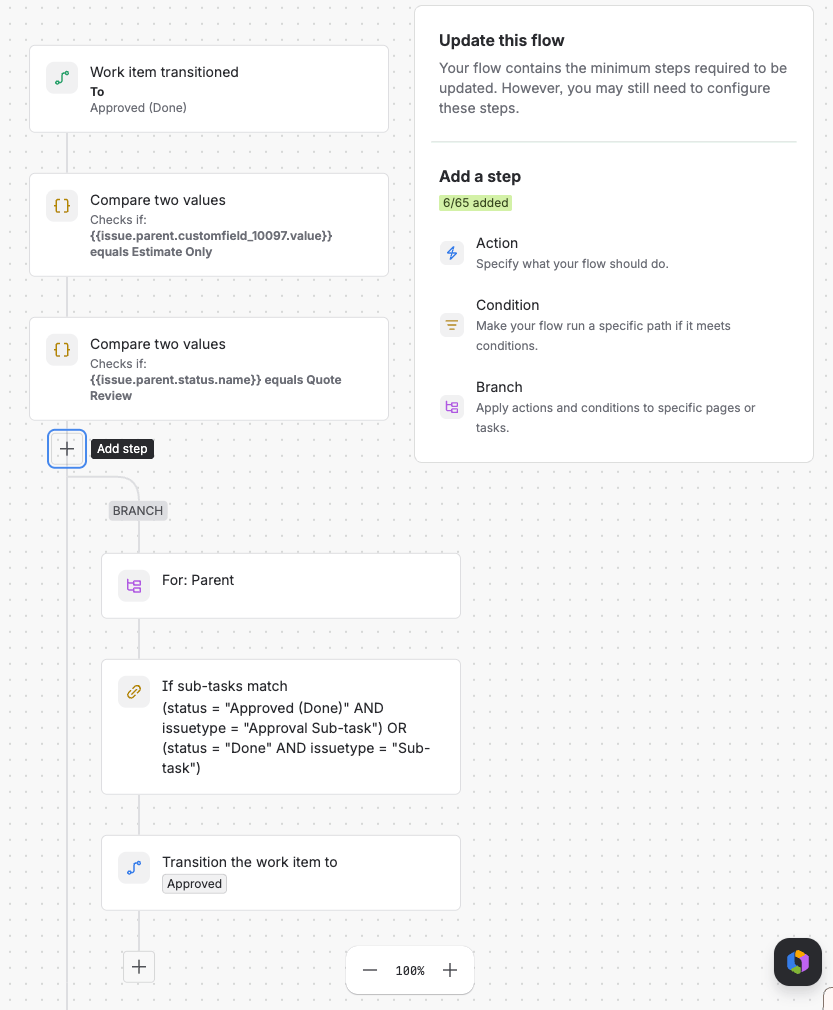
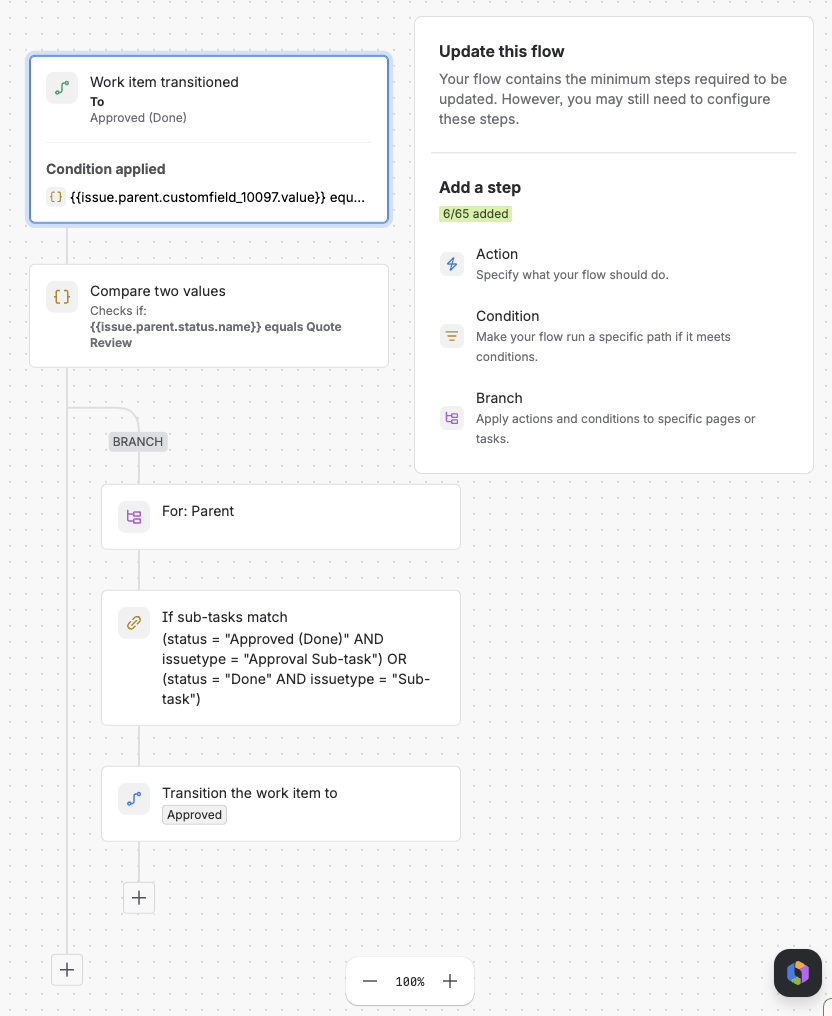
The counter in the corner reads 6/65 both times. The condition moved, and it’s still a step. What rides free is the trigger’s own setting, the “To: Approved (Done)” part, and that’s all Atlassian’s documentation means when it says a condition set inside the trigger doesn’t add a step. Anything you bolt onto the trigger card is a regular condition with a new address.
If you spent part of your fall rebuilding rules to move conditions into triggers on my say-so, I’m sorry. That was a lot of work for nothing.
Now the good news, and the reason this post exists: as of November 5, that whole argument is moot. Four weeks before automation billing starts, Atlassian changed how the meter counts. Runs that stop before any action no longer count toward your usage at all, trigger and conditions included, which, you know, is how things have been working for three years now.
That one change takes most of the step count out of automation built the way most of us build it, and it removes the scariest risk of the meter I wrote about in September. It doesn’t make the meter go away, though. So here’s what changed, in plain terms first, then what it saves you, what still bites, and what I’d do before the first invoice. I’ll also tell you where automation ranks among my own worries, because once I could see real numbers, it wasn’t at the top.
What Changed on November 5
Atlassian’s Charlie Gavey posted the update to the Atlassian Community, and it boils down to three things:
- Runs that don’t perform an action don’t count. Starting November 5, if a flow stops before any action runs, none of its steps count. The audit log marks those runs “No actions performed.” Usage recorded before November 5 stays as it was.
- More visibility, starting in December. Each app’s automation Usage tab will rank flows by steps used, the audit log will show steps per run and per step, and CSV exports will carry step counts. A step estimate in the flow builder is rolling out now, so you can see what a flow is likely to cost before you turn it on.
- Usage controls in 2027. Organization admins will get more control over how steps are used across users and agents. Details later.
The announcement is half the story. The usage documentation got updated alongside it, and it answers a pile of questions I left open in September. Here’s the meter as documented when I wrote about it then, and as documented today:
| What | As documented in September | As documented now |
|---|---|---|
| Run that stops before any action | Trigger and every condition evaluated count | Nothing counts |
| Run that performs at least one action | Every step that executed counts | Unchanged |
| A condition that evaluates to false | Counts as a step | Counts, unless no action runs in the flow |
| Aborted or throttled run | Aborted runs listed as charged | No steps charged, including steps before the stop |
| Branch or loop component | Not settled | Counts once; steps inside count per item |
| Log action, create variable, lookup table, re-fetch, lookup work items | Some listed as excluded | All five listed as not counting |
| Use Rovo, Use agent, Use Jira Coding agent | Confirmed to me in a LinkedIn comment, not documented | Documented: billed in Rovo credits, not steps |
| Third-party AI actions such as Use Cursor or Use GitHub Copilot | Not addressed | Count as automation steps |
| Overage price | I said it was unpublished | $0.50 per 1,000 steps |
| Allowances | Per user, pooled across the organization | Unchanged |
| Billing starts | December 3, 2026 | December 3, 2026; Enterprise at first renewal on or after that date |
That overage price shows up on the usage page, the automation licensing FAQ, and the usage packs page, where prepaid step packs run at the same $0.50 per 1,000. Pay-as-you-go is on by default. Organization and billing admins can set a monthly limit or turn it off, and if it’s off when the pool runs dry, your flows stop until usage resets.
I want to be fair to Atlassian here, because they’ve earned it. They announced the meter on September 1, and for two months the community let them have it: admins, partners, consultants, and anyone else who’d ever built a rule, in comment threads, posts, and account calls, explaining in detail why the meter would punish perfectly reasonable automation. Atlassian listened and changed course a month before the first bill. That’s not nothing. Plenty of vendors would have waited until the invoices went out and called the backlash a communication problem. (On a much smaller scale, it’s also the second time they’ve cleaned up a loose end I raised. The AI-action rule they confirmed in a comment on my first post is now written into the documentation.)
What the Change Saves You
Near the bottom of the announcement thread, Patricia Francezi posted the numbers for one of her flows, Auto-Add Participants. It ran 725 times. Seventeen of those runs did something. The other 708 fired, checked a condition, found nothing to do, and went back to sleep.
Under the September rules, those 708 runs cost a trigger and a condition each: 1,416 steps spent deciding not to do anything, against as few as 51 for the 17 runs that did the work. About 96% of that flow’s bill was the flow equivalent of opening the fridge, staring, and closing it again. Since November 5, all of that is free.
Her flow isn’t unusual. Most of us were taught to trigger broadly and narrow with a condition, because under the old run-based allowance a run that did nothing cost nothing. When I worked the examples for my step-counting post, the do-nothing runs came to about 71% of an ordinary transition rule and about 70% of a fifteen-minute polling rule. For rules shaped like that, November 5 cut most of the bill.
The bigger win is what those runs would have done to the pool. Steps are granted per user and pooled across the organization, so a run that does nothing draws on the same allowance as a run that routes a P1 incident. In September I estimated that one rule polling every fifteen minutes and usually finding nothing would burn on the order of 5,700 steps a month. Ten of those is about 57,000 steps. A 50-person team on Jira Premium gets 37,500 steps a month in total. Ten quiet rules would have drained the whole pool before a single useful thing happened.
With pay-as-you-go on, that team pays a few dollars this month. The trouble is that nobody notices, and a few dollars is only where a runaway rule starts. With it off, flows stop until usage resets, and “flows” includes your SLA escalations, your access provisioning, and your incident routing. Picture explaining to a service owner that their SLA rule stopped firing on the fourteenth because ten polling rules ate the pool. That was the worst outcome of the September meter, and it’s the one November 5 kills.
It also saves your rules from people like me. Under the September counting, the cheap rule and the readable rule pulled in opposite directions, and my advice pushed you toward cheap. Casey Gould summed up the relief in the thread: no more rebuilding every automation, and back to modular conditions that are easier to maintain instead of cramming everything into JQL. Between my testing and the November 5 change, there’s no step-count reason left to fold readable conditions into a trigger, and there never was much of one. Write them for the poor admin who inherits the rule.
What Still Bites
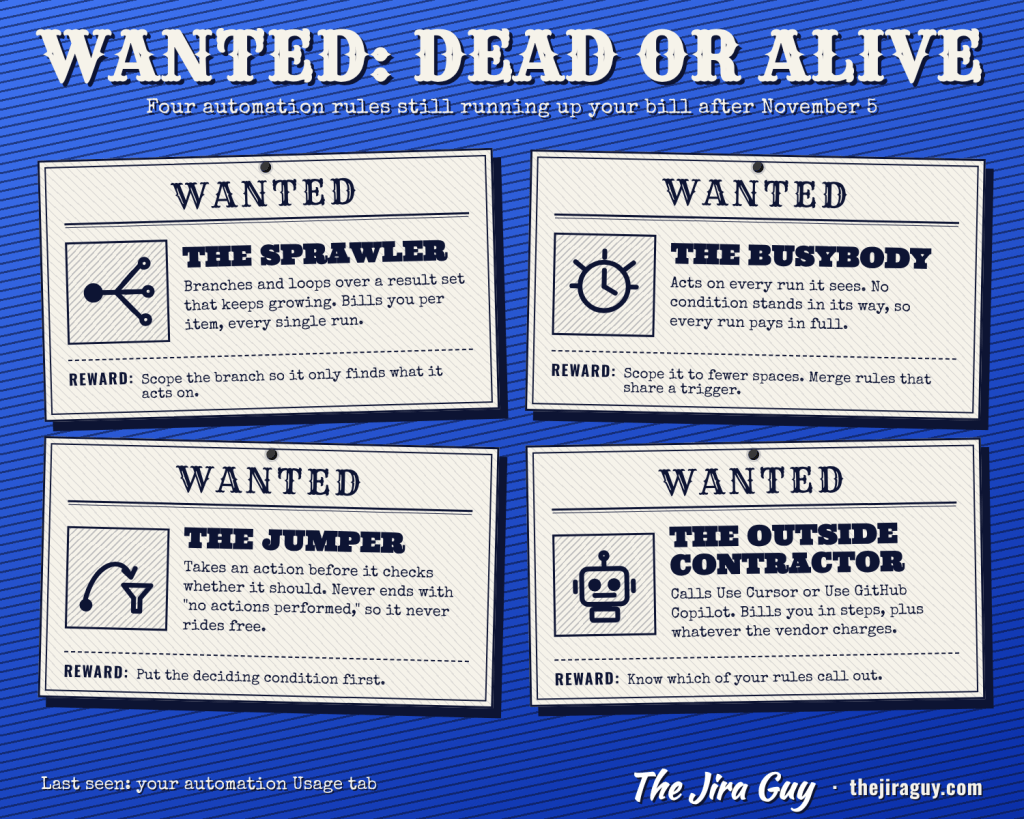
Here’s the catch. If filtered runs are free, every step you pay for now comes from a run that did something. The vampire draw is gone, but what’s left is rules with a real appetite, and loops lead that list. They were always one of the two big drivers of the step meter, alongside the do-nothing runs. With the do-nothing runs out of the picture, loops are the biggest one standing.
- Rules that branch or loop over a growing result set. The branch or loop component counts once, but every step inside it counts per item, and the number of items belongs to your data, not to you. A sweep written against a space with 300 open work items behaves very differently against one with 4,000, and nobody has to touch the rule for that to happen.
- Rules that act on every run. On work item created, set a field. On any update, copy a value somewhere. No condition in the way means every run performs an action and pays in full, so the cost scales with your workload.
- Rules that take an action before they filter. The free pass only applies to runs that end with no action performed. Put any counted action ahead of the deciding condition and no run can end that way.
- Rules that call outside AI. Atlassian’s own agentic actions bill in Rovo credits, but Use Cursor and Use GitHub Copilot count as automation steps, on top of whatever that vendor charges you.
That third one is brand new, because it only exists thanks to the free pass. It’s also the one I’d bet is hiding in somebody’s instance right now. Take a rule like this:
- Trigger: Work item updated
- Action: Send web request, looking the work item up in an external system
- Condition: The response says the record is out of sync
- Action: Edit work item fields
Every update fires the web request, so every run performs an action and every run gets billed: three steps for an update that needed nothing, four for one that needed the fix. If that space sees 10,000 updates a month and 2% need a fix, the rule bills 9,800 × 3 + 200 × 4 = 30,200 steps. That’s most of a 50-person Premium team’s pool, from one rule, mostly to confirm nothing was wrong. If any part of the decision can be made before the web request, with a condition on fields already on the work item, the runs that condition filters out go back to free.
Delays may belong on the same list. Rebekka Heilmann of viadee posted test results in the thread: in her testing, a delay counted as a step and flipped the run’s status to success even when nothing else happened, which would make any run with an early delay billable. That’s community-reported and I haven’t reproduced it myself. Once per-run step counts land in the audit log in December, it’s an easy one to check.
Then there’s the timing. Billing starts December 3, step-level reporting arrives in early December, and the usage controls show up in 2027. Until then your only lever is pay-as-you-go on or off with a monthly limit, set once for the whole organization. Kris Dewachter raised the sharpest version of this in the thread: an organization with several sites that each pay for their own licenses still shares one pool, so one site can spend another’s allowance, and the site that stayed under budget has no way to opt out of paying for the one that didn’t. When I wrote this, nobody from Atlassian had answered. They describe the 2027 controls as covering “users and agents,” which may or may not reach as far as sites.
What to Do Before December 3
Most of my September to-do list survives, minus the parts this change retired (and minus the trigger advice I’ve already apologized for). Here’s the list as it stands now, roughly in the order I’d do it:
- Decide what happens when the pool runs out. In Atlassian Administration, go to Usage, then Meters. Pay-as-you-go is on by default with no limit. Leave it on with a monthly limit you picked, or turn it off knowing that off means flows stop. Either is defensible. Leaving the default in place because nobody looked isn’t.
- Find your top five flows by steps. In Jira, go to Settings, System, Global automation, and open Usage. Sort by steps. For each of the top five, ask three questions: does it loop over a result set, does any action run before its filter, and does anyone own it.
- Put readable conditions back. If your team folded conditions into JQL or triggers this fall to save steps, the saving was never there or went away on November 5. The maintenance cost didn’t.
- Merge rules that share a trigger and all act on it. Each rule that acts pays for its own trigger, so three created rules in one space that each set a field buy three triggers per work item where one rule would buy one.
- Scope the rules that act on everything. Narrow them to the fewest spaces they need.
- Stop tuning schedules for the meter. Empty polls are free now. Set each schedule for how fast the work needs to happen.
- Give every busy flow an owner. If you built the inventory I suggested after Team ’26 Europe, add a column for whether each rule acts on every run and another for whether it loops.
- Ask your account team about site-level controls if you run more than one site in one organization.
- Keep the step-count exports once they arrive in December. The FAQ says allowances are unchanged when billing starts, and also that Atlassian periodically re-evaluates them with advance notice. I’ve been around long enough to read that second sentence twice. The best argument in any future allowance conversation is your own numbers.
- Look at every meter, not just automation. Atlassian Administration’s usage view shows Rovo credits and Bitbucket build minutes alongside automation steps. The next section is why I’d spend more of my time there.
Automation Was Never My Biggest Meter
Let me be honest about proportion. The November 5 change is good news, and Atlassian deserves every bit of credit I’ve given it. But on the enterprise instance I administer, once the usage meters showed real numbers, automation steps were the smallest of my worries. This change made a small worry smaller.
The meter I watch most closely is Bitbucket Pipelines build minutes. Usage growing over time is part of that, but the bigger problem is the waste already sitting in existing repositories, because nobody ever had to watch build minutes closely before: steps and images sized bigger than the work needs, deployments run far more often than anything uses them, and pipelines that run on every commit instead of on merge. None of that looks like a problem until there’s a meter on it. Then it looks like a line item.
The other is Rovo, because Atlassian keeps inventing new and more expensive ways to use it. Rovo Work, the long-running mode announced at Team ’26 Europe, runs tasks Atlassian says can take “tens of minutes to tens of hours.” When I wrote about it in October, nothing on stage explained how a Work task draws credits, and I haven’t seen it documented since. Until it is, its effect on our Rovo usage is an unknown, and an unknown on a meter is harder to plan for than a big number.
For scale: a basic Rovo request costs 10 credits, or ten cents past the allowance, the same money as 200 automation steps. Don’t read that as automation being cheap, though. Steps are cheap one at a time and add up fast at volume. Every million steps over the allowance is $500, and a busy loop nobody’s watching can run through millions in a month. With pay-as-you-go on and no limit set, every one of them lands on the invoice.
Your instance may not look like mine. The only way to know is to open the usage view and look at every meter side by side. If yours looks like mine, spend the time this change saved you on the other two.
Wrapping Up
I was wrong about triggers, Atlassian fixed the bigger problem anyway, and I’ll happily take that trade. For rules built the usual way, most of their step count was runs that did nothing, and that count is now zero. No more quiet rules draining the pool until something critical stops firing, and no more reason to trade a readable rule for a clever one. What’s left is a meter that only charges for work done, which puts loops, rules that act on everything, and rules that act before they filter at the top of your list, with the controls to manage them still a year out.
If you’ve only got twenty minutes this week, do the first two items on that list: make the pay-as-you-go decision on purpose, then open the Usage tab and ask your three questions about your top five flows. That’ll tell you more about your December exposure than anything Atlassian has published.
And if you rebuilt rules this fall because of my September posts, I’d like to hear how far you got before the rug moved, and what you’re doing with them now.
Until then, this is Rodney, asking: have you updated your Jira issues work items today?
Enjoyed this one? These posts are free and always will be — but if this saved you a headache or taught you something worth keeping, you can drop a tip in the Ko-fi jar. No paywall, no subscription, no catch. Just a thanks if the writing earned it.
→ Support The Jira Guy on Ko-fi
Discover more from The Jira Guy
Subscribe to get the latest posts sent to your email.


Rodney, another great article and I appreciate your clarity in explaining the latest changes.
One thing I will add is that I attended two Atlassian-hosted webinars about UBP when they first announced it, and in both webinars the Atlassian staff were asked whether trigger conditions were going to be counted as additional steps. They were clear that trigger conditions were NOT counted as additional steps (that is, the trigger “card” is one step whether or not it includes conditions). That was a relief to me, and I’ve been combining conditions with the trigger where it makes sense; as long as the automations are stable with that change, I’ll leave them that way.
LikeLike