
Paid Partnership with TitanApps
In 2008, a team working with the World Health Organization put a one-page checklist into operating rooms at eight hospitals, in cities that included Seattle, London, New Delhi, Manila, and Amman. Nothing on it was new medicine. Its ask was simple: just have the surgical team stop at a few critical moments, such as right before the first cut, and confirm that every person in that room already knew what to do.
When the results were published in the New England Journal of Medicine the following year, the rate of major complications had fallen from 11% to 7%, a drop of more than a third. And in-hospital deaths fell from 1.5% to 0.8%, very nearly half.
Atul Gawande, who was part of that work, wrote it up in The Checklist Manifesto, and the lesson he drew is the one to carry through this post. The checklist didn’t teach anyone surgery. It caught the steps that people who do these procedures day in and day out skip because they’re skilled, and it worked because it was visible right when the decisions were made, not hidden away in a hallway somewhere. “Out of sight, out of mind,” as they say.
I saw the impact of this during my heart surgery in early 2025. Before being put under, while I was still very conscious and aware, I was asked who I was, my date of birth, and what exactly I was there to have done. In that day’s checklist, this was the point to make sure everyone agreed they had the correct patient (very important, if I do say so myself) and the correct procedure (considering what I was having done, immensely important).
That was the first of three pause points on the list. The second comes right before the first cut. The last comes after the surgery is over and before the patient leaves the room, when the team confirms every instrument, needle, and sponge is accounted for. The first two are a Definition of Ready: is everything in place to start? The last is a Definition of Done: is the work finished, and did we leave anything behind?
Most Definitions of Done live in the virtual binder down the hall, which is to say in a Confluence page people haven’t checked since their instance was on Server edition. They get written in a retro and left there, while the real decision about whether something is done happens on a Jira board, in a drag from one column to the next, with no list in sight.
This is especially true when your team is in a hurry. When a story, a bug fix, or a release has to be done yesterday, that’s when it’s most tempting to skip steps and get yourself into trouble that will cost you even more time to untangle.
So today we have two jobs. The first is how to write a Definition of Ready and a Definition of Done that hold up, which works whatever tool you use. The second is whether Smart Checklist by TitanApps is a good way to put those lists on the work item in Jira Cloud, right at the moment work changes hands. Along the way I tested a claim TitanApps made to me directly: that its built-in automation doesn’t touch your Jira Automation allowance. With metered automation billing starting December 3, that claim matters more than any feature on the list.
A word on the partnership: TitanApps paid for this review. They read the draft before it published, to flag anything factually wrong or confidential. They didn’t get to change my conclusions, and they knew that going in.
A Definition of Done Is a Checklist, So Write It Like One
Gawande sorts checklists into two kinds. A DO-CONFIRM list is for people who do the work from memory and then stop at a pause point to confirm nothing got missed. A READ-DO list is for following step by step, where the order matters. A Definition of Done is a DO-CONFIRM list. Nobody builds a story by reading the DoD line by line; they finish the work, then check it against the list. A test plan is READ-DO, and plenty of unread DoDs have drifted into being one: thirty lines long, half of them steps instead of checks.
He’s also blunt that a checklist has to be short enough to get used. The WHO team dropped a fire-safety check from the surgical list because surgical fires are rare, and kept the wrong-patient check because it takes seconds and missing it is catastrophic. That trade, between how often a step gets skipped and what skipping it costs, is the one to make with every line of a Definition of Done.
Put that together and a usable DoD follows four rules:
- Every item is a yes/no question someone can answer by looking. “Tested” fails that. “The pipeline passed on the merge commit” passes.
- Every item has an owner. If no one in particular checks it, no one checks it.
- Every item can be answered “not needed.” A list with no way to say “doesn’t apply” teaches people to tick boxes that aren’t true, and then nobody trusts any of the ticks.
- It’s short enough to read at the pause point. Past ten items, you’re usually looking at a test plan in disguise.
Here’s what that does to the Definition of Done most teams have. The before version is five items long and impossible to check:
- Code complete
- Tested
- Documentation updated
- Meets acceptance criteria
- Reviewed
The after version is longer per line and much shorter to verify:
- Pull request merged, with at least one approving review (developer)
- Each acceptance criterion demonstrated to the product owner (product owner)
- Automated tests added or updated, and the pipeline passed on the merge commit (developer)
- Release note written, or marked not needed (developer)
- Support or runbook page updated, or marked not needed (developer)
“Code complete” disappeared because a merged pull request already proves it. “Reviewed” became a specific event with a specific number attached. “Meets acceptance criteria” moved to the product owner, the one person who can sign it off. Nothing here is specific to Smart Checklist or to Jira. If you take one thing from this post, take this rewrite back to your team.
Ready and Done Belong at Different Moments
The surgical checklist works because it has pause points: specific moments where the team stops and checks. A Jira workflow already has those. They’re called transitions.
A Definition of Ready belongs at the hand-off into the team. That’s either when a work item gets created or when it moves into “Selected for Development,” depending on how your board works. Its owner is whoever writes the work item, usually the product owner, and its job is to stop half-formed work from entering a sprint.
A Definition of Done belongs at the hand-off out of the team: the transition into Done, or into review or QA if your workflow splits those. Its owner is the person doing the work.
That gives you two short lists at two moments, with two different owners. The mistake I see most is one long list, attached to nothing, owned by everyone. The question for any tool, then, is whether it can attach the right list to the right transition and hold the work there until the list is done.
Putting the Checklist on the Work Item With Smart Checklist
Smart Checklist adds a checklist to every work item. You open it from the apps icon (the hexagon under the summary) by choosing Smart Checklist, and then you can type into it directly or write it as Markdown, which turns out to be the most useful thing about it (more on that in the templates section). I started a trial of the Cloud edition earlier this month on a fresh Jira Cloud site. When I set it up on my own site, the install was the easy part. The step that caught me was Smart Checklist’s custom permissions, which give you finer control over who can view, add, check off, or delete items. Once you turn them on, they have to be granted to a role in the permission scheme, and until they are, nobody sees the checklist at all.
Templates. You save a checklist as a template and apply it to any work item. I built the Definition of Ready and Definition of Done from the previous section as two templates. Saving a checklist as a template and importing it onto another work item both worked without a hitch, and every template in a space can be viewed, edited, and managed under Space settings → Apps → Smart Checklist, on the Checklist Templates tab. By default, anyone who can edit a work item can save its checklist as a template, and a space admin manages templates and sets the defaults.
Default templates. This is where the pause-point idea starts to work. Each template has an Advanced tab where you set a trigger and conditions: a work item being created, transitioned, or updated, filtered by work type, status, labels, and a handful of other standard fields. I set the Definition of Ready to import when a Story is created, and the Definition of Done to import when a work item moves into In Progress from Backlog or Selected for Development. A new Story got the Ready list the moment it was created. An Epic created in the same space didn’t, which is exactly what the work type condition is for. Moving the Story to In Progress added the Done list underneath the Ready list, taking it to 0 of 10 items, rather than replacing what was there. Nobody had to remember to add either one.
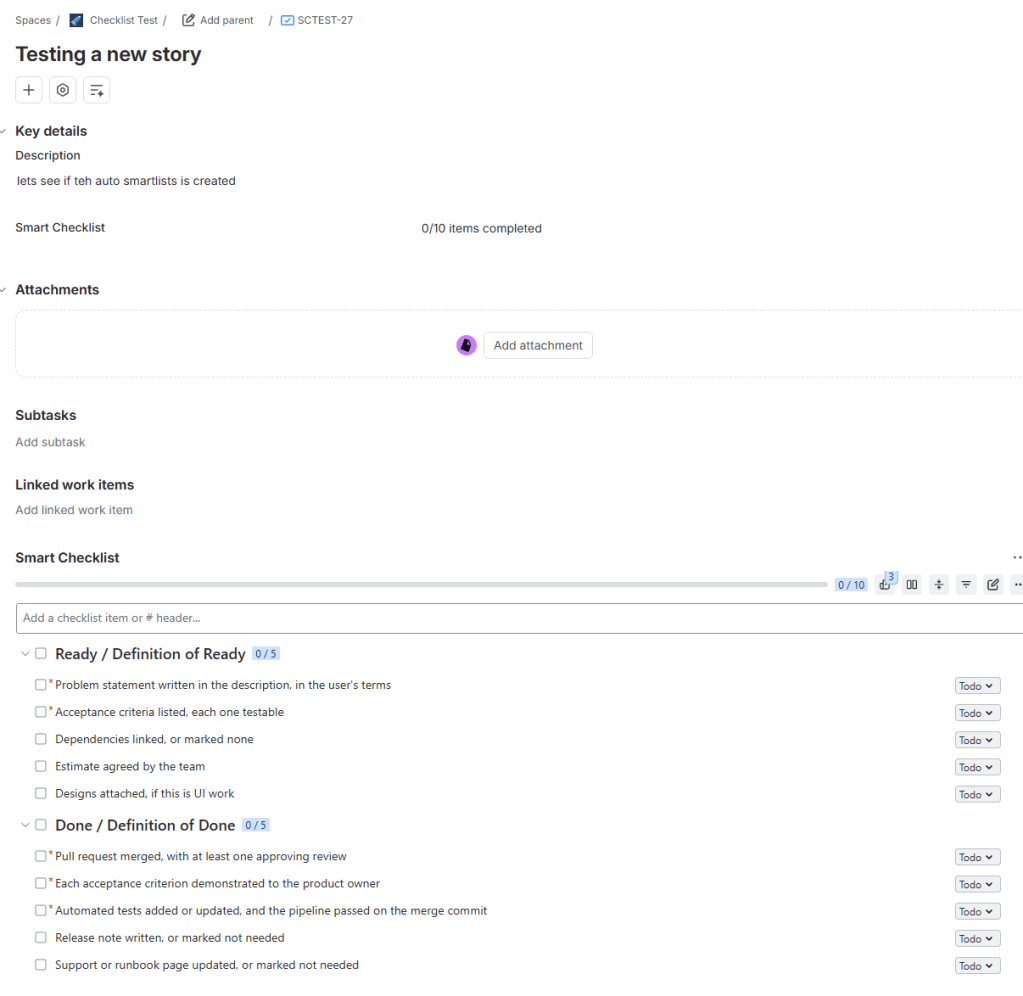
Tabs. Smart Checklist turns any top-level header written as # Header / Tab name into a tab. In the default list view, those headers become collapsible sections instead, each with its own progress count, so a work item carrying both Ready and Done stays readable either way.
Blocking the transition. This is the feature that makes a Definition of Done a gate instead of a suggestion, and the one with the most important fine print. Smart Checklist adds a workflow validator called “All mandatory items completed.” Add it to the transition into Done, and Jira refuses the move while any mandatory item is still open. With the mandatory items open, Jira stopped the move with “We can’t move Story SCTEST-1” and the default line “Complete all mandatory checklist items.” You can replace that second line with your own; I used “Finish the Definition of Done first,” which tells the person who got blocked which list they still owe.
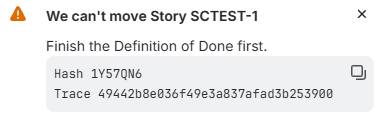
Once the three mandatory items were checked off, the transition went through with the two optional items still open. It isn’t the only gate on offer: Smart Checklist can also hold a transition until the whole checklist is complete, until one header or tab is, or until the mandatory items in one tab are. That last option suits the setup in this post, because with Ready and Done on the same work item, the gate into Done can check the Done list alone.
Three details matter a lot if you’re a team lead:
- The validator checks mandatory items only. You mark an item mandatory with an exclamation point after its prefix (
-! Pipeline passed on the merge commit). Optional items never block anything, which is the right design: it forces you to decide which lines are the wrong-patient check and which are nice to have. A mandatory item marked skipped counts as complete, so “not needed” is an answer the gate accepts. - The validator is a Pro feature. TitanApps is ending support for its separate Free app on December 15, 2026, so Pro is the version to evaluate.
- It works in company-managed and team-managed spaces. That matters for team leads, because many of them run team-managed spaces so they don’t need an admin to change the workflow. In a team-managed space, the space admin can add the gate without anyone else’s help.
In a company-managed space, adding a validator means editing the workflow, which takes a Jira admin. That would be true with or without a Marketplace app; it’s how Jira workflows work. The practical advice for a team lead: bring your admin a five-line DoD and the name of one transition. That’s a small ask, and it’s a much easier conversation than “please build me a validator.”
Progress shows up on the board too. Add the Smart Checklist Progress field to the board’s card layout and each card carries a count; SCTEST-1 read 3/5 once its mandatory items were done.
QA Checklists Are a Different Kind of Checklist
Back in May 2023 I wrote about a different checklist app and the objection every admin raises first: “I have subtasks; why do I need a checklist app?” My answer then was that a checklist is another tool in the toolbox, and “I’d only fight them on that if some higher-level reporting depended on the sub-tasks, which rarely happens.” That still holds, and the QA use case is where it shows most clearly.
A QA pass is a READ-DO list. A tester works through it in order and records a result for each line. Teams that model that with one subtask per test case end up with a backlog full of objects that exist only to be closed. Smart Checklist handles it with custom statuses, so a line can be Passed or Failed rather than just ticked, plus headers to group cases by area and the option to assign a line to a person with a due date. TitanApps suggests applying the QA template automatically on the transition into “Ready for Testing.” Each custom status gets a name, a color, and a checked or unchecked state, and that state decides whether a line counts as done. I made Not run gray and unchecked, Passed green and checked, and Failed red and unchecked. With a mandatory test case marked Failed, the validator refused to let the work item move to Done, which is exactly what you want from a test plan.
There’s a limit here, and it’s worth being plain about. A checklist is enough when the test run lives and dies with one work item. Once you need runs repeated across releases, traceability from requirement to test to defect, or a report that someone outside the team reads, you need a test management tool such as Xray or Zephyr, not a checklist. TitanApps pitched this as a QA checklist, not as test management, and that’s the right scope. Inside that scope it replaces a lot of subtasks. The regression template at the end of this post picked up the custom statuses as soon as it was pasted in.
Does the Built-In Automation Stay Off Your Allowance?
Here’s the claim, in TitanApps’ words from our first exchange: “These automations run directly inside the app and don’t require Jira Automation rules or automation steps.” TitanApps’ own September post on the subject is more specific: “The built-in triggers use no automation steps, but every flow run does.”
That matters because of what starts on December 3. As I covered in Atlassian Metered Your Automation, Jira Automation moves to a step-based meter, and every step of every execution counts, including runs that do nothing. An app that does its own automation outside that meter is offering something with a dollar value attached. So it’s worth testing rather than repeating.
There’s a reason to test it carefully rather than just look for an empty usage screen. According to TitanApps’ own documentation, Smart Checklist keeps checklist data in three places: app storage, issue properties, and a custom field called “Checklists.” The app’s automation can run outside Jira Automation and still write to that field. If one of your existing rules triggers on a work item being updated or on a field changing, that write could wake your rule up, and your rule is on the meter.
Here’s the test. I ran it on my own site, which had no other automation flows at all, so anything the audit log or the meter recorded had only one possible source:
- Note the starting figures on the Usage tab of your space’s Automation settings (or under Global administration for the whole site).
- Use the template’s Advanced settings to import the Definition of Done when a work item moves to In Progress.
- Move ten work items to In Progress.
- Check the Usage screen and the automation audit log again.
- As a control, build the same thing as a Jira Automation flow: a transition trigger plus Smart Checklist’s Import Checklist Template action, which asks for the template’s ID from Space settings → Apps → Smart Checklist. Move ten more work items through it.
- Add a simple rule that triggers when a work item is updated, then let Smart Checklist apply a checklist, and see whether the rule fires.
The built-in trigger did its job on all ten work items. Each one had the Definition of Done the moment it reached In Progress, and the automation audit log recorded nothing at all. The control flow logged ten successful runs, one per work item, each a transition trigger followed by the import action. That’s the claim confirmed in one screen: the built-in trigger never ran as a Jira Automation flow, and the control ran ten times. Don’t expect the Usage screen to show you this in the moment. It isn’t real time, and neither the space view nor admin.atlassian.com had caught up with the control runs by the time I finished. The audit log is where the answer is.
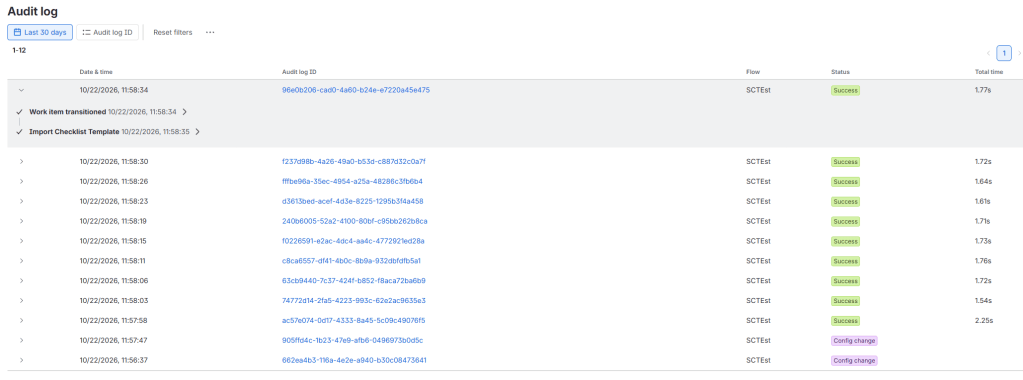
The side-effect test is where the fine print shows up. My flow that comments whenever a work item is updated ran twice, four seconds apart, when I moved one work item to In Progress and Smart Checklist added its checklist. The History tab shows why: adding a checklist means the app’s own account writes three fields (Checklists, Smart Checklist, and Smart Checklist Progress), on top of the status change and the board’s rank change from the move itself. Every one of those is an update your existing flows can see.
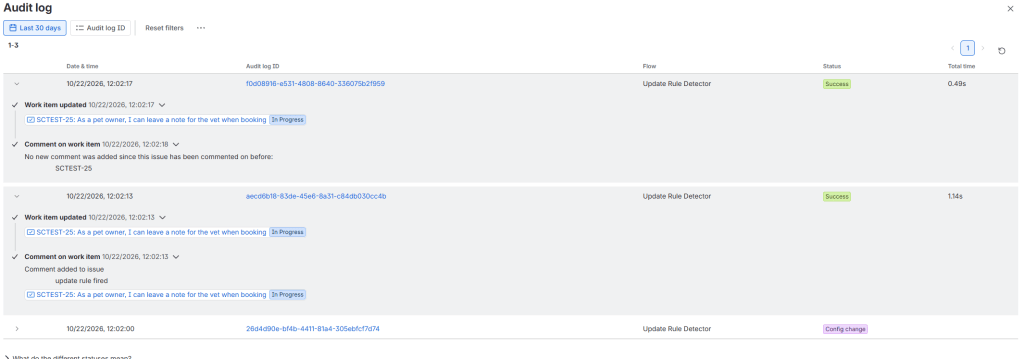
So the claim holds as TitanApps states it. The built-in triggers don’t run as Jira Automation flows and don’t touch your allowance. What they can do is wake up flows you already pay for. Before you count on the savings, look for “work item updated” and “field value changed” triggers in the spaces where you’ll use Smart Checklist, and narrow them to the fields those flows care about.
One update to my step-counting post: in September, the Usage screen still counted runs. It now shows estimated automation steps, with a per-flow breakdown and a split between Jira and other apps, so a test like this shows what each run cost rather than just whether it happened.
Copy-Paste Templates
Because Smart Checklist reads Markdown, a template is just text. Paste any of these into the checklist editor on a trial and you have a working list in under a minute. The syntax in one line: - is to do, + is done, ~ is in progress, x is skipped, an exclamation point after the prefix makes an item mandatory, # Header / Tab makes a tab, and a line starting with > adds details under the item above it.
Definition of Ready
# Ready / Definition of Ready-! Problem statement written in the description, in the user's terms-! Acceptance criteria listed, each one testable- Dependencies linked, or marked none- Estimate agreed by the team- Designs attached, if this is UI work
Definition of Done
# Done / Definition of Done-! Pull request merged, with at least one approving review-! Each acceptance criterion demonstrated to the product owner-! Automated tests added or updated, and the pipeline passed on the merge commit- Release note written, or marked not needed- Support or runbook page updated, or marked not needed
QA regression (set up Passed, Failed, and Not run as custom statuses first)
# QA / Regression## Sign-in- [Not run] Sign in with a valid SSO account- [Not run] Sign in with an expired password and confirm the reset prompt## Notifications- [Not run] Assignee receives an email on assignment> Check the spam folder on the test mailbox too
Treat these as starting points. The four rules matter more than my wording: yes/no, owned, “not needed” allowed, short.
Where It Fits, and Where It Doesn’t
Who should try it: team leads who want their Definition of Done enforced at the transition, in either kind of space, without anyone building more than one validator. QA leads replacing per-test-case subtasks with a single checklist.
Who should think twice: teams that need real test management, and anyone with broad “work item updated” flows who hasn’t narrowed them yet.
Pricing: The paid Cloud app is priced per user per month on the Marketplace. It’s free for sites with up to 10 users, then USD 0.90 per user for 11 to 100 users, USD 0.70 for 101 to 250, and USD 0.24 for 251 to 1,000, dropping to USD 0.02 at the largest tiers. Those are October 2026 prices, so check the listing for current numbers.
TitanApps is giving readers of this post 15% off the yearly plan for one billing cycle with the code MEKN4U, valid until May 1, 2027. You can start a trial from the Smart Checklist Marketplace listing.
Wrapping Up
A Definition of Ready and a Definition of Done work when they’re short, checkable, owned, and sitting on the transition where the work changes hands. Most teams have the lists and none of the rest. The team that asked me my name and my procedure that morning almost certainly knew both of those pieces of information already. They asked anyway, because asking takes seconds and getting it wrong can’t be undone. That’s the job both of your lists are doing. Smart Checklist is a solid way to put them on the work item in Jira Cloud and hold the transition until they’re done.
Here’s something to do this week, app or no app. Open wherever your team’s Definition of Done lives today and count the items. Rewrite each one as a yes/no question with a name next to it, mark the ones that can honestly be “not needed,” and cut until you have nine or fewer. Then pick the one workflow transition where that list should stop the work. You’ll find out fast whether your team agrees on what done means.
I’m curious how long your team’s Definition of Done is right now, and when anyone last read it.
Until then, this is Rodney, asking: have you updated your Jira issues work items today?
Enjoyed this one? These posts are free and always will be — but if this saved you a headache or taught you something worth keeping, you can drop a tip in the Ko-fi jar. No paywall, no subscription, no catch. Just a thanks if the writing earned it.
→ Support The Jira Guy on Ko-fi
Discover more from The Jira Guy
Subscribe to get the latest posts sent to your email.


