

Paid Partnership with Revyz
Hey there, Jira Guys and Gals! Yes, it’s been a minute. Between putting together talks post Team ’24 and working on The Jira Life, I’ve had little creative juice left for here. Fair enough, but there is only one way to get back on the horse, which starts now.
Revyz contacted me not too long ago and unloaded some interesting info. Apparently, this article I wrote back in 2021 is one of the top Google returns for “Jira Backup.” But, looking back at it, it could be better. First off, it’s exclusively about DC and Server. I still think this holds up for those running DC, but we know most people these days are on Jira Cloud.
Second, while the basics are there, I’ve delved deeper into the world of backups, uncovering some fascinating insights. So, I’ve decided to share these backup basics and then compare how Atlassian’s backup solution measures up against the Revyz solution. Without further delay, let’s dig into this.
Backup Basics
So, let’s start with the basics here. What constitutes a healthy backup regiment? When are there too many backups, and when are they not enough? I think to me that proper backup health covers a few things:
- First, you have enough of them in the right places.
- Two, they are automatic.
- You should still test your backups regularly.
- The procedures for accessing and restoring them are accessible.
- You should know how much data you are willing to lose (Recovery Point Objective, or RPO) and how long you want it to take to restore service (Recovery Time Objective, RTO)
3-2-1 Rule for Backups
So, first, we need to ensure you have enough backups. For this, I employ the 3-2-1 Rule. Have you never heard of it? Simply put, it is:
- You should have 3 copies of your data: One original and two copies
- They should be on 2 different media: tape, cloud storage, hard disk, etc.
- And 1 of those copies should be kept offsite.
For example, for my local NAS, I have the following setup:
I have three copies of the data:
- The Original TrueNAS Core Server
- A secondary QNAP NAS that stores a copy of the data, which is delta backed up nightly, full backup Weekly
- A backup stored in Backblaze also backed up weekly
This satisfies the 3-2-1 Rule well. I have three copies of the data, which are locally split between two separate systems. Yes, they are both hard drives, so if you are a purist, consider my offsite backup to be both the second type of media and my one offsite backup.
Automation
Second, your backups should be automatic. You should not have to think about this process day-to-day because, eventually, you will stop doing it. This isn’t your or your team’s fault – this is just human nature. You get busy with higher-priority tasks, and boom, you’re in an emergency and realize your backups have not been run for two months. Which, I’m sorry to say that two months of lost work would be unacceptable.
Ideally, you should use a system that will also let you know if your backup script/process has failed, allowing you to take proactive steps to resolve the issue quickly. Going back to my Local NAS example, I use some built-in utilities in TrueNAS Core to run my backups, but I’ve also set them up to email me if the backup fails so I can look at what’s happening when (not if, when) that does happen.
Test your backups
So, in an emergency, there are three situations you want to avoid. As I described above, the first is realizing you haven’t been taking backups for some extended period. The second is that you have been taking backups that are corrupt or otherwise unusable.
Unfortunately, this problem can be invisible until you use the backup. And nothing sucks more than you going into this situation thinking everything is in hand, just to have that last-minute realization that you’re up a creek without a paddle.
So, how do we prevent this? Well, you have to use the backups regularly. You should take the latest backup once a quarter and try to restore the system. Now, for space concerns, you might not be able to do this but once a year or so—but it’s still an important exercise. Not only does this ensure that your backups are usable, but it also drills your team in on what to do so that when the emergency does hit, and they need them, your team is well practiced.
Your Restoration Practices should be documented and accessible.
So, you know your backups are happening regularly, and that they are good. What’s the third scenario you want to avoid? Well, it’s you have a disaster, and while you have good backups, you have no idea what to do with them because all your documentation is gone with the disaster.
This is a special problem for Confluence Admins, but there are reasons to make it a more universal practice. Most teams’ documentation lives in Confluence, and that’s great because they can reference the Confluence page when their system is down. What do you reference when Confluence itself is down? And that might not be the only problem rendering Confluence inaccessible. Maybe your internet connection(s) is down, the power is out, or the building is gone entirely. There are many reasons to have a backup for your procedures, too.
This, though, has a rather simple solution. The last time I checked, the paper didn’t run out of batteries or need to be plugged in. Don’t get me wrong, it isn’t foolproof, either. Paper can still be burned or blown away. I usually recommend having your entire DR (Disaster Recovery) plan printed out, bound (3-ring binders are cheap enough), and sent home with multiple trusted team members – preferably in different cities. This increases the chances that at least one copy will survive just about anything, allowing your team to have the playbook to follow should they need to fix things.
RTO and RPO
Let’s ask ourselves two very simple questions:
- How long are we willing to be down?
- How much data are we willing to lose?
These two questions embody the principle between the Recovery Time Objective and the Recovery Point Objective.
Alternatively, RTO can be thought of as “How long does it take to restore from a backup,” while RPO asks “How old, at its max, is our youngest backup?”
In my example, the bottleneck for both backup sites is the NIC on the primary NAS Server, where I have two bonded Gigabit ports, giving a max (theoretical) throughput of 2Gbps.
I have backups totaling about 4 TB, which means that given my max theoretical throughput, I can expect about 4.5 hours of data transfer plus another half hour of system setup. Given these factors, I can expect an RTO of around 5 hours on my current setup.
Back when I was a Jira Admin, I’d usually time the process during my backup restoration tests (on a non-prod) to see what my current RTO was. If I only had to restore the database, I could have Jira back up and running with Prod data in about an hour—including time for Jira to start back up and us to test that it’s working. If I had to restore attachments, the time went up to about three hours. That was what would be considered a modest system by today’s standards.
Typically, to reduce this RTO, you need either faster storage or more bandwidth, which are difficult to upgrade in “living” systems. This makes this number difficult to affect and more dependent on how much data you have.
RPO is trickier to nail down. For my Local NAS example, the answer will depend on what source I”‘m using for backup. My Offsite has an RPO of one week, while my local secondary NAS has an RPO of one day. You can usually make this number go down by doing more frequent backups. Some database systems update their backup continuously, making the RPO approach zero. This can be done for everything, right? Well…Yes, but actually no.
There is a limit to how much data you can back up. Depending on the amount of data and how much it changes, we can start running into the bandwidth problem again.
Ideally, with most of your backups, you’d only be backing up “Deltas” or what has changed or been added. Deltas can be dramatically smaller than your full dataset, which makes capturing them faster. However, they have their risks. If any of your deltas is corrupted or missing since your last full update, that’s the end of the chain. The previous delta is the last point you could restore to. That is why taking a regular “Full backup” is still a good idea to act as a new starting point for your deltas. This is the approach I am taking with my local NAS, where I take a full backup weekly, then take the delta’s nightly throughout the rest of the week.
The Showdown
So now that we have the basics down, let’s take a look at Atlassian Backup and Revyz to see how they do on these four criteria.
I’ll be testing this against my Jira Cloud test instance, which has 13 Projects, 112 Fields, and 1844 issues. By no means the largest of jira instances, but should be sufficient for the test.
Atlassian’s Built-In backup
For Atlassian Cloud’s default solution, I’m going to be following this guide. It’s important to note that this export won’t get everything. The document itself says it will not include the following items:
- Automation rules
- Third-party apps and app data
- Jira Service Management features powered by Opsgenie, (including all content accessed through the Opsgenie URL, as well as alerts and on-call schedules)
- Insight for Jira Service Management
- Product access settings (you’ll need to add users to groups for permissions to apply).
- Views (views configuration and insights for Jira Product Discovery).
So, to do this form of backup, you need to go to the Setting Gear > System > Backup Manager. Most of the time, you will take a backup for Cloud.

From here, I wait until it is done, and download it. What happens now is entirely on me. So, let’s look at our criteria for a good backup regime and see how many of our points we hit.
3-2-1 Rule
So, this one is a tossup, because it fully depends on what you do with it. If I throw this backup onto my NAS that I know satisfies this rule? Then Yes. If I leave it on my desktop? Then No, I won’t.
Automatic
Atlassian fails HARD on this requirement. There is no automatic way to set up this backup. I mean, there is a Github repo for a python script that scrapes the site for the backup, but even that is one change away from being useless…which considering the script was last updated 2 years ago, may have already come and gone.
Testable
This one, Atlassian gets a pass. I can always stand up a new Cloud site, then test your import there. It’s a bit of work, but any good Backup Recovery Test will be, so that’s not a point against it.
Restoration practices documented
Atlassian has the process for restoring the backup listed on the same page – so this is simple enough to print out and have in your DR Binders. I’d call this a pass
RTO and RPO
This one worries me the most. You see, you can only take that manual backup once every 48 hours. Which means if you are absolutely on top of your game and remember – every 48 hours – to click that button, wait however long it takes, and download that file, you still will only have an RPO of 48 hours. That’s two days of effort you could lose.
As for RTO, I took the backup provided and tested it restoring. Now mind you, this is a tiny Jira site by modern standards, so I wasn’t expecting it to take too much time. And I wasn’t disappointed – the time from I clicked Import to the time I finished the process was just over 5 minutes.
Revyz
I often say the best place for documentation to be is where you’re working. And Revyz didn’t fail this – as the documentation is included in the “Support center” item in the sidebar. But honestly, I didn’t feel as though I needed it – everything seemed relatively straightforward. That being said, you shouldn’t assume just because you figured it out, the next person will be able to. As such, I’ll also be taking screenshots not only for your benefit, but for my own reference.
Seriously, it’s ridiculous how often I use TJG as my own documentation site.
We go to our Settings Gear > Apps > Find new apps, then search for Revyz, and install the Revyz Data Manager for Jira|Backup Restore Analyze Optimize

Once it’s installed, I go to Revyz Data Security > Backup on the sidebar, then click “Get Started”

This gives me some options – some I have to enable later (like Automation Rules) by adding an API Key, but most of these seem reasonable.

Then I need to tell it what projects get backed up – which Ideally is all of them. This also happens to be how many are set by default, so that’s always a good sign.
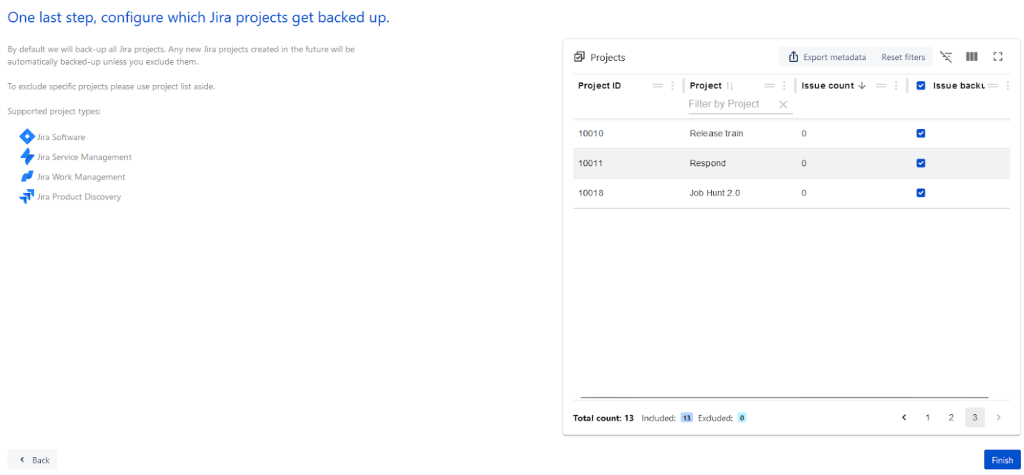
So I click “Finish,” and it has a pop up asking if I want to run a backup immediately for some items, and do I agree to the settings.
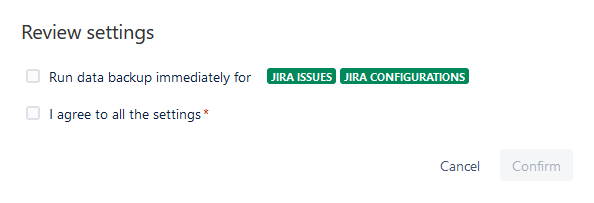
I click both, then confirm, and am taking to this screen where I can see my backup job is queued.

Once it’s done I’ll of course be testing a restore to see how that works, but in the meantime, let’s see how this stacks up against our Healthy Backup Regiment Criteria we specified.
3-2-1 Rule
So – this is important. I cannot stress this enough. If you are trusting a service for your backups, you need to know their backup strategy is on point. I don’t want you to trust that they are – I want you to ask. You should be looking them in the eye and asking point-blank how do they handle their backups.
Which is exactly what I did. And what did Revyz tell me? Well, they setting up and utilizing features built into AWS to make sure their data is backed up to multiple data centers across a particular region – with each Data Center a “meaningful distance” from each other while being within 100km from each other. (60 Miles in fantasy units).
I like this not only because it satisfies the 3-2-1 rule, but it also is automatic, which again, means that you aren’t dependent on some setup that has to be maintained.
Automatic
Whereas Atlassian’s built-in solution failed this – miserably, this passes. It takes a backup each night without me having to take any actions. If a backup fails – for whatever reason – you can set it up to create a Jira ticket, which in turn can trigger an email.
Personally, I would like to see it generate a ticket AND an email going to a group of people, but you can set up that last part on your own when A4J (Or Scriptrunner, Powerscripts, etc) detects an appropriate ticket.
Testable
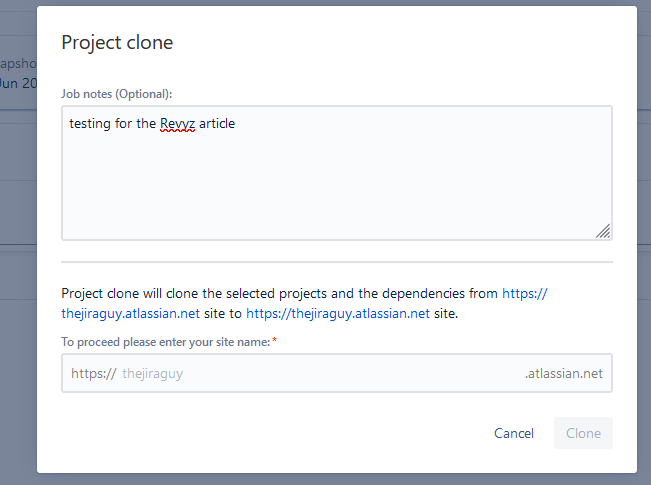
This one also gets a pass – you can clone your existing projects – issues and all – to a new Jira Site to allow you to test what you get when you restore.
Restoration practices documented
Again, like Atlassian, Revyz has the documentation for restoring a site at the same place. I’d still take my own screenshots and prepare my own docs, but it’s a good backup to your backup.
RTO and RPO
Revyz only allows you to back up daily at most – meaning your RPO is going to be around 24 hours – which is half of what the built-in solutions will allow. Furthermore, because it’s automatic, it’s not dependant on you remembering anything.
As for RTO – I only did a clone of my largest project. But considering it is worth 92.5% of my issues on this instance, I think it’s substantial enough I can still use it as a reference. Not Apples to Apples, but close enough. I kicked it off and let it run for 5 minutes – which is about as long as the total restore took on Atlassian’s side. During that time it did restore the project, but it was still working on the issues, having completed around 200 of the 1700 total. This might be partly my fault, as there appears to be an issue with setting resolutions when it’s not on the appropriate screen, but the fact is that it still was slower.
I brought this up with Revyz after my testing. Yes, Atlassian does have an advantage in the full backup, considering they are coming in through the backend, but Revyz gave me a situation I hadn’t considered for my testing but I should have: A partial restore.
Let’s say you only wanted to restore a single project or just the settings for that one project. Under Atlassian, you have to take that backup, dissect it to get only the bits you wanted out, and restore those – or worse yet, in some cases, manually restore them based on the backup. Tedious, painful, and a terrible RTO. However, using Revyz solution, you select the projects – or yes, even the specific issues OR settings within a specific project – you want to restore, then hit go. These restores are much faster than you would have to do with Atlassian’s solution, meaning your RTO would be much better in these scenarios.
My next question to them was, “Well, how often do you see people doing partial restores vs Full restore?” To which they had an answer right away. According to their data, more people are, in fact, using them for partial restores. So it seems even from the jaws of defeat, Revyz takes the win in this category.
The Verdict?
Look, is the Revyz solution perfect? No. They are slower to do a full restore, but I’m not sure that’s their fault. Atlassian has access to the backend system that lets them do things much faster. And I still think the holy grail is a backup of the Atlassian toolset to storage I control – be that Backblaze (not sponsored by them, but I love their solution), an Amazon B3 Bucket, or a NAS cobbled together from a variety of old HDD in the corner of the server room. And this is something in their backlog – though right now, it’s a low priority.
But I think Revyz gets the win today simply because they are automatic. Look, life gets busy. If a backup process depends on you doing something, it eventually won’t be done. And that is Atlassian’s solution thus far.
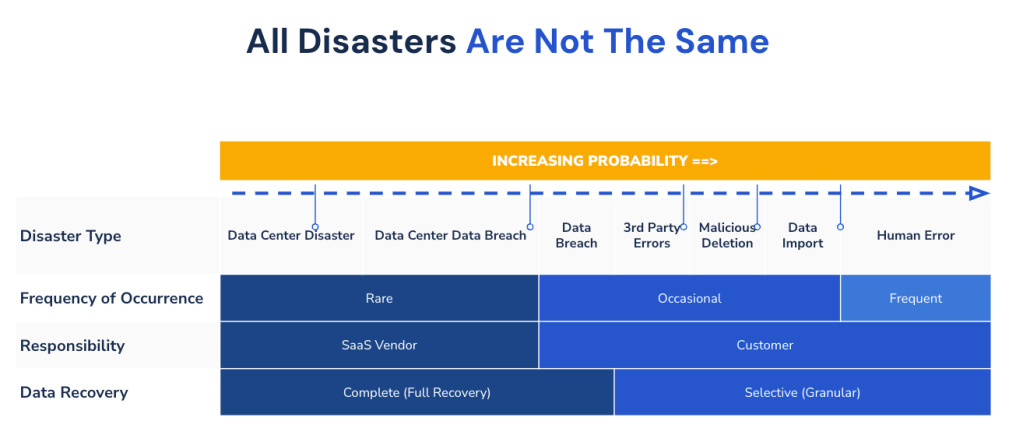
And yes, I can hear those of you saying, “It’s a cloud solution; that’s their concern.” Yes, it is. But that’s when – and only when – they mess up. Do you have an employee go rogue, or does someone does an “Oops” on your super important project that’s about to ship? They won’t help you with that.
And even if it is something they messed up, we’ve seen outages for a while. I mean, everyone should remember the 2022 Outage when Atlassian’s initial estimates to have everyone restored was upwards of a month. Thankfully, they got most people back online much sooner, but if I – as a Jira Admin – told my boss the company would be without Jira for a month, I’d be fired, and rightfully so.
So, please, have a backup plan. And considering all my requirements, Revyz is the best solution I’ve seen for Jira Cloud so far.
However, why take my word for it? You can check out Alex’s video on Revyz here, or click here for a free trial of Revyz backup, recovery and data management app on the Atlassian Marketplace.
Final Thoughts
So, yes, it’s been a bit. But I’d like to get back into posting here. That being said, I hope you will also check out The Jira Life – a collaborative effort with Alex (of Apetech fame), Bob Wen (Author and Producer extraordinaire), and me. This Thursday we’ll be looking back at our year so far – it’s hard to believe we are already halfway through Season 2! And we have a new show coming out on Mondays that is your Atlassian news update in 15 minutes or less!
In speaking of Alex and Bob, us three along with Ed Gaile recently wrote a book! It’s a guide not just for Atlassian Jira, Confluence, Bitbucket, Compass, or any other tools out there – but the definitive guide to using all these tools together to make a robust DevOps chain. It comes out July 19th, but it’s available for preorder today!
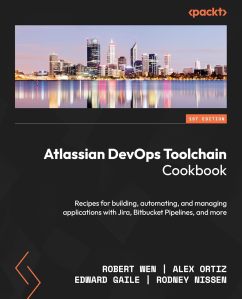
I have a few articles in the work – including some collaborations with Seibert Media, and a much anticipated response to Atlassian’s comments on Data Center at Team ‘24. But if there is any other topics you’d like me to touch on, please let me know in the comments!
But until then, my name is Rodney, asking, “Have you updated your Jira issues today?”
Discover more from The Jira Guy
Subscribe to get the latest posts sent to your email.


